

ASCII animations are a fascinating area where retro aesthetics and modern technology converge in the digital design world. Using these effects, especially in modern design tools like Framer, can add a unique character to your projects. So, how do you create ASCII animations in Framer? This question is a topic of interest for many designers and developers.
What is ASCII Animation?
ASCII (American Standard Code for Information Interchange) animations are the art of creating visual effects using text characters. These animations create visual compositions using characters (e.g., @, #, %, *) instead of traditional pixel-based images. Thanks to modern web technologies, these effects can now be rendered in real time using WebGL.
Challenges of Creating ASCII Animations in Framer
Although Framer is a powerful design and prototyping tool, it does not offer a direct solution for creating ASCII animations. Here are the main challenges encountered:
Requirement for WebGL Knowledge
Creating ASCII animations requires knowledge of WebGL (Web Graphics Library). This poses a technical barrier for many designers. Writing WebGL shaders, understanding vertex and fragment shaders, and optimizing them is a highly complex process.
Performance Optimization
Real-time ASCII animations can cause performance issues, especially at high resolutions. Rendering thousands of characters per frame consumes significant CPU and GPU resources. Therefore, careful optimization is required.
Customization Options
Different ASCII effects may be required for different projects:
Different character sets (dense, medium, sparse)
Color effects and tint settings
Noise parameters
Distortion and warp effects
Brightness, contrast, gamma settings
Vignette effects
Manually coding each one is a time-consuming and error-prone process.
Framer Integration
Integrating Framer's component system with WebGL code requires extra attention, especially for responsive designs. Issues such as canvas resizing, aspect ratio preservation, and adapting to different screen sizes are important.
Solution: AsciiMotion Plugin
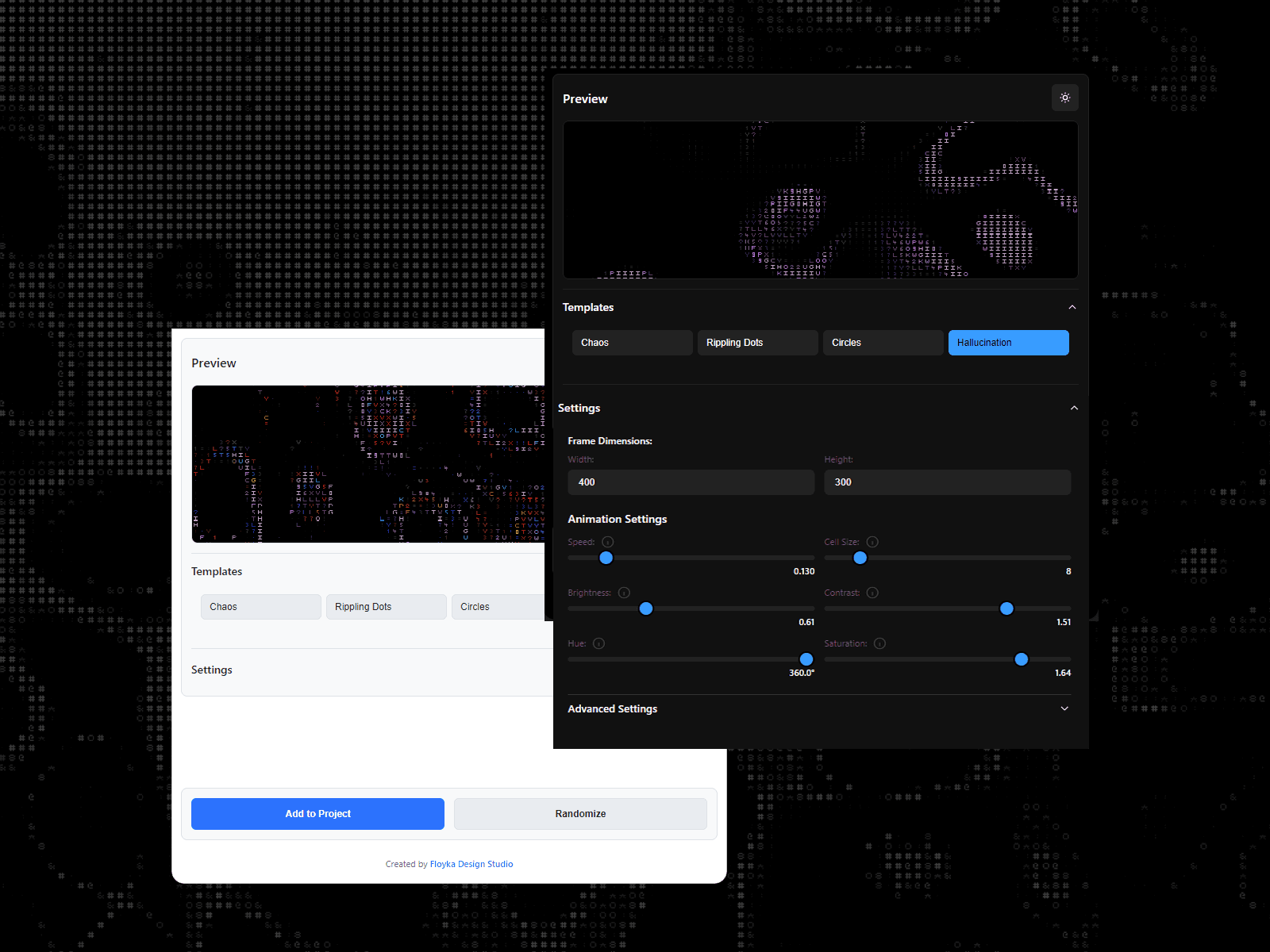
Considering all these challenges, we developed the AsciiMotion plugin, designed specifically for Framer. This plugin solves all the technical challenges mentioned above, allowing designers and developers to easily create ASCII animations.
Features Offered by AsciiMotion
Ease of Use
Full integration with Framer's native component system
Easy addition via drag & drop
Instant preview with visual control panel
Extensive Customization Options
Basic Settings
Noise Strength & Scale: Controls the intensity and scale of the animation
Speed: Adjusts the animation speed
Cell Size: Determines the size of ASCII characters
Visual Effects:
Character Sets: 3 different character set options (dense, medium, sparse)
Color Tint: Color tinting with RGB values
Brightness & Contrast: Brightness and contrast settings
Gamma Correction: Image gamma correction
Hue & Saturation: Color hue and saturation control
Advanced Effects:
Distortion Amplitude: Image distortion amount
Frequency: Animation frequency
Z-Rate: 3D depth effect
Vignette: Edge darkening effect
Vignette Softness: Vignette softness
Glyph Sharpness: Character sharpness